JSON Formatter

右键页面任意节点,一键格式化其中的 JSON,还能自动识别 CSV / XML / YAML,四种格式一键互转。可折叠、可搜索、可编辑,支持校验、并排对比、JSONPath、值解码与类型生成。所有处理都在本地完成。

Right-click any element to turn its JSON — or CSV / XML / YAML, auto-detected — into a collapsible, searchable, editable tree, and convert between all four formats in one click. With validation, side-by-side diff, JSONPath, value decoding and type generation. Everything runs locally.

四格式互转4-format conversionJSON / CSV / XML / YAML 自动识别、一键互转JSON / CSV / XML / YAML: auto-detect and convert in one click
错误 JSON 也能解析Parses broken JSON宽松修复、截断补全、日志多片段提取Lenient repair, truncation fix, multi-fragment extraction
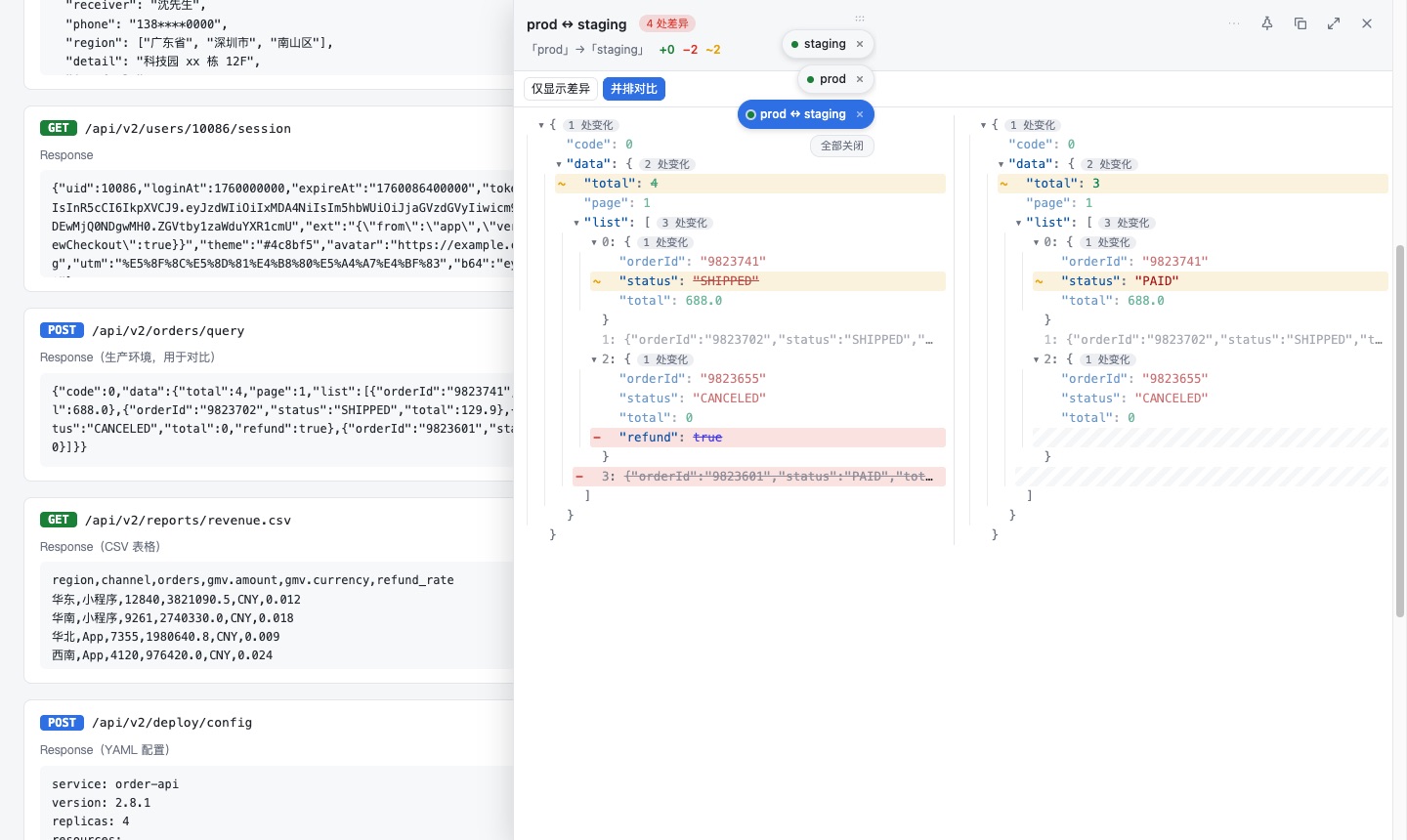
并排对比Side-by-side diff左右分栏逐行对齐,可只看差异Aligned two-column diff with changes-only mode
100% 本地100% local不上传、无统计、无广告No uploads, no analytics, no ads

格式识别与互转Formats & conversion

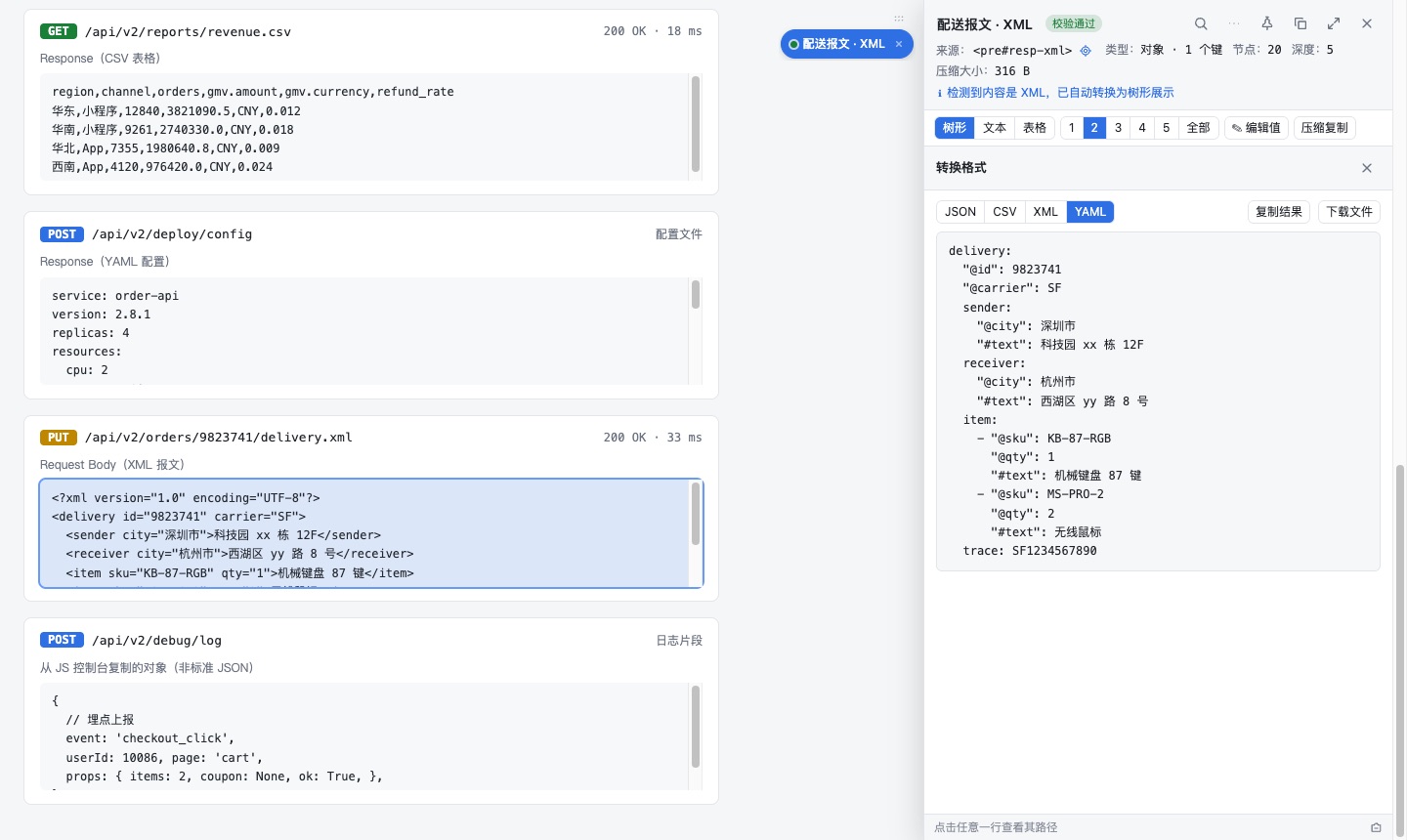
JSON ⇄ CSV ⇄ XML ⇄ YAML 一键互转

Convert JSON ⇄ CSV ⇄ XML ⇄ YAML in one click

「⋯」→「转换格式」在四种格式之间互转,可复制结果,或下载 .json / .csv / .xml / .yaml 文件。属性、数组、嵌套结构都能正确映射。

“⋯” → “Convert format” converts between the four formats. Copy the result or download .json / .csv / .xml / .yaml. Attributes, arrays and nesting are mapped correctly.
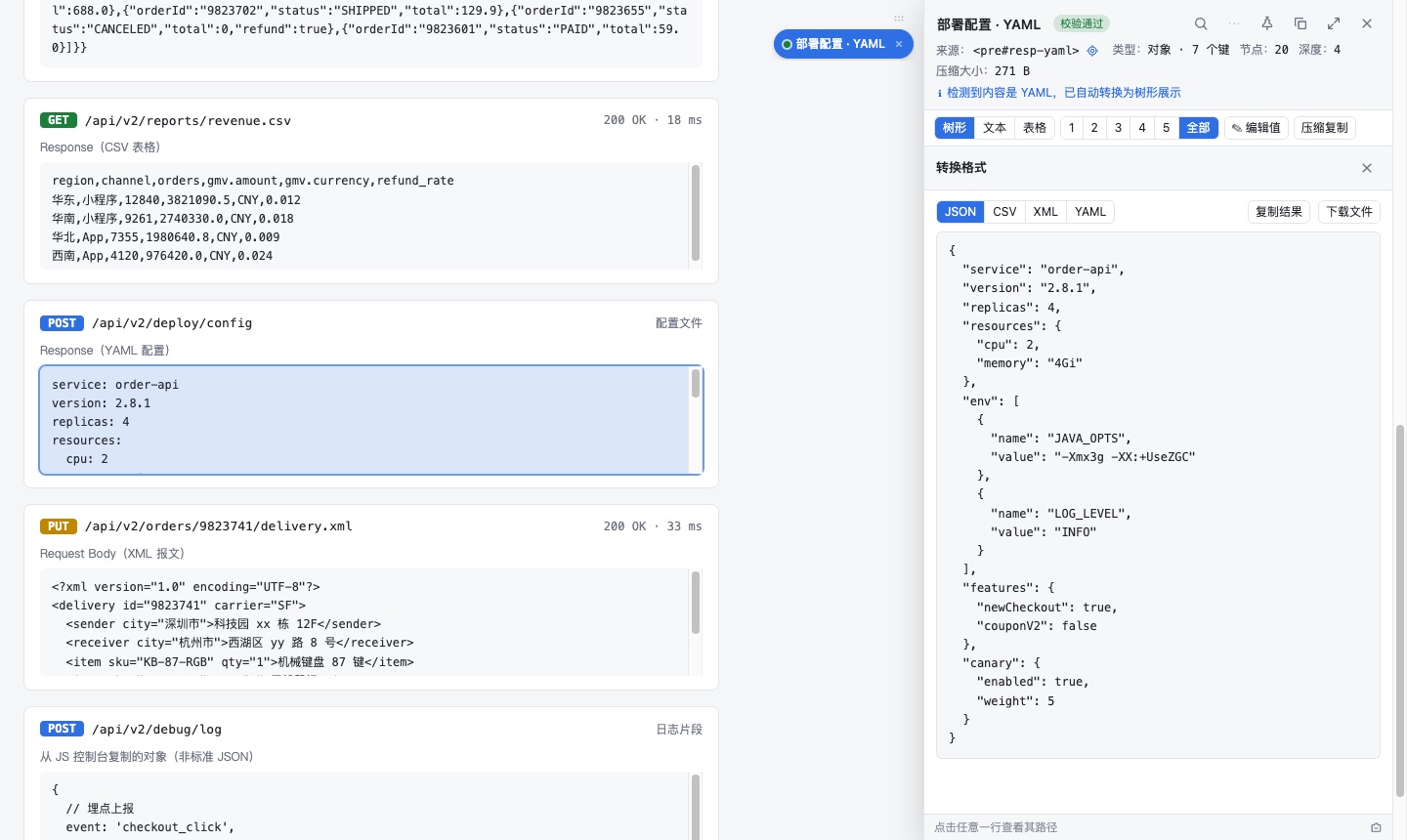
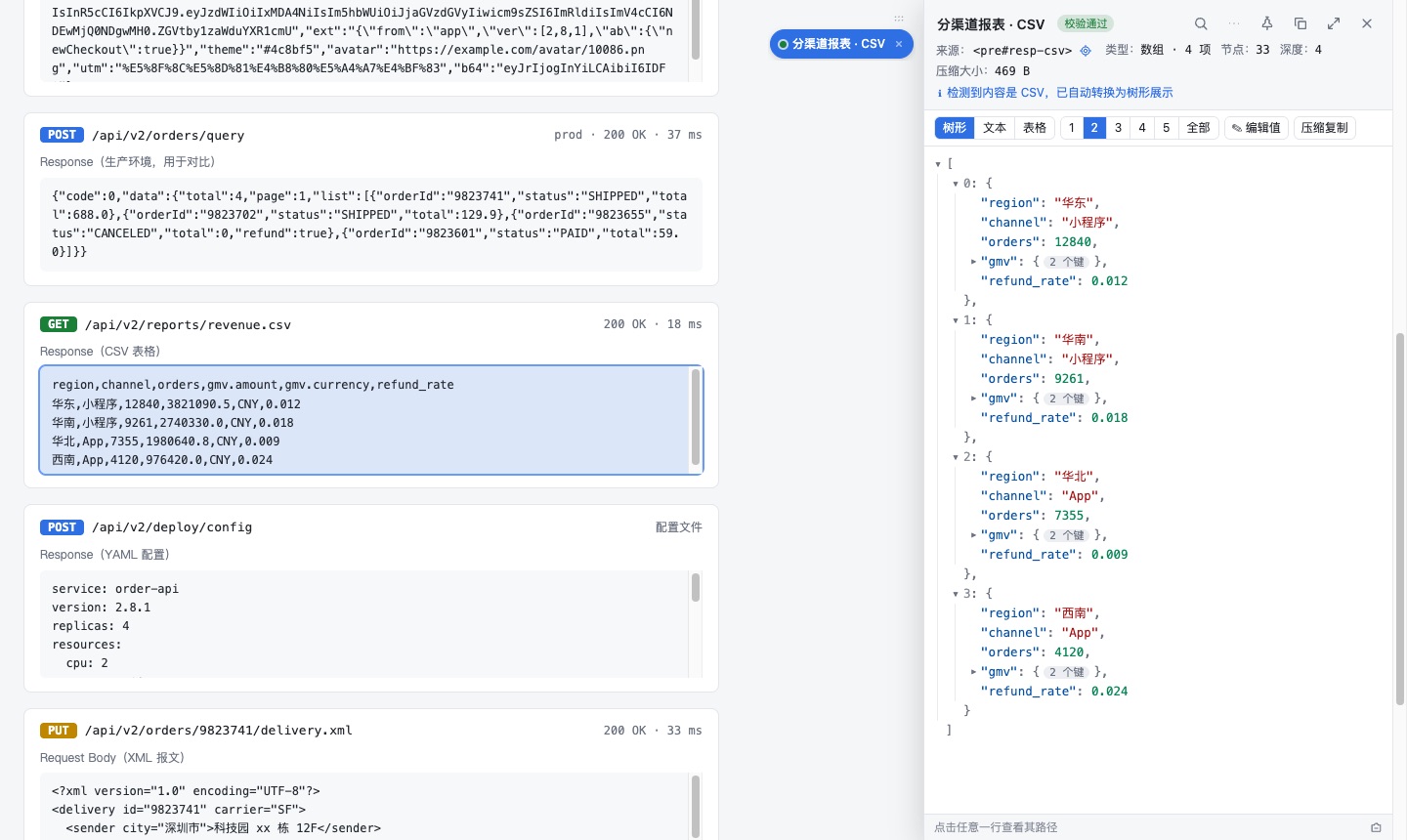
Convert JSON ⇄ CSV ⇄ XML ⇄ YAML in one click

自动识别 CSV / XML / YAML

Auto-detects CSV / XML / YAML

右键、选中文本快捷键、粘贴对话框三个入口都能认出这三种格式,自动转成树形,搜索、编辑、JSONPath、类型生成、对比全部可用。CSV 表头 a.b.c 还原为嵌套对象。

Right-click, the selected-text shortcut and the paste dialog all recognize these formats and show them as a tree, so search, edit, JSONPath, type generation and diff keep working. CSV headers like a.b.c become nested objects.

Auto-detects CSV / XML / YAML

XML 属性与重复元素正确映射

XML attributes & repeated elements, mapped right

属性映射为 @attr,文本映射为 #text,同名兄弟元素合并为数组,支持 CDATA、注释、DOCTYPE。YAML 支持嵌套、列表、[a, b] / {a: 1}、块文本与注释。全部本地解析,不依赖第三方库。

Attributes map to @attr, text to #text, repeated siblings merge into arrays; CDATA, comments and DOCTYPE are handled. YAML supports nesting, lists, flow style, block scalars and comments. All parsed locally, no third-party libraries.

XML attributes & repeated elements, mapped right

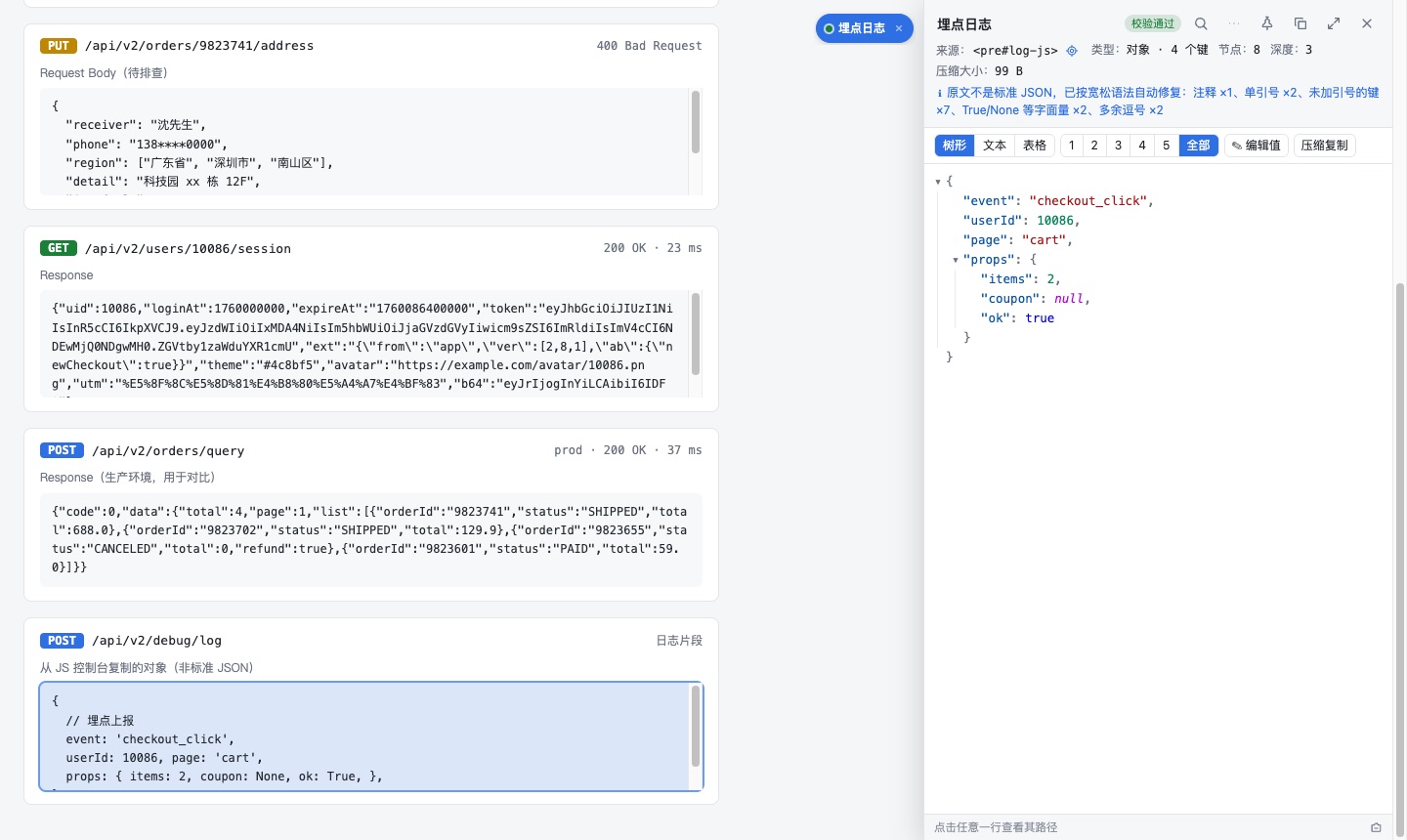
错误 JSON 也能解析:宽松修复

Broken JSON parses too: lenient repair

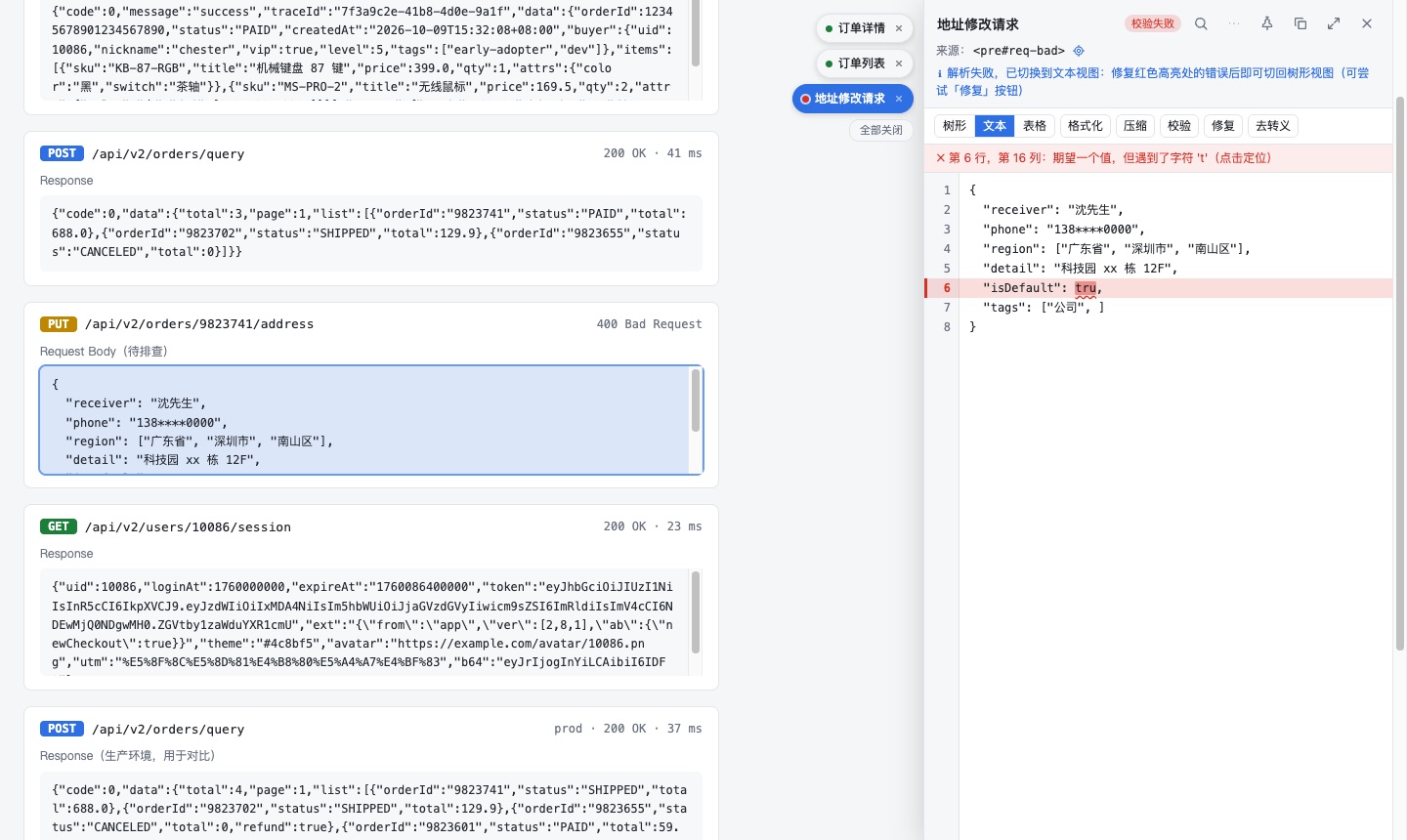
单引号、注释、尾逗号、缺逗号、未加引号的键、True / None / undefined、十六进制数字,解析时自动修复并列出修复项;文本视图还有「修复」按钮。

Single quotes, comments, trailing / missing commas, unquoted keys, True / None / undefined and hex numbers are repaired on parse, with a list of what was fixed. Text view also has a “Repair” button.

Broken JSON parses too: lenient repair

日志容错:截断补全与多片段提取

Log-friendly: truncation fix & multi-fragment extraction

日志平台复制的内容被截断(缺右括号 / 右引号)会自动补全;一行里混着多段独立 JSON(如 message={...}, fields={...})会分别识别,各开一个面板并排展开。

Content truncated by a log viewer (missing closing brackets / quotes) is auto-closed; a line mixing several JSON blobs (e.g. message={...}, fields={...}) is split into separate panels, opened side by side.

查看View

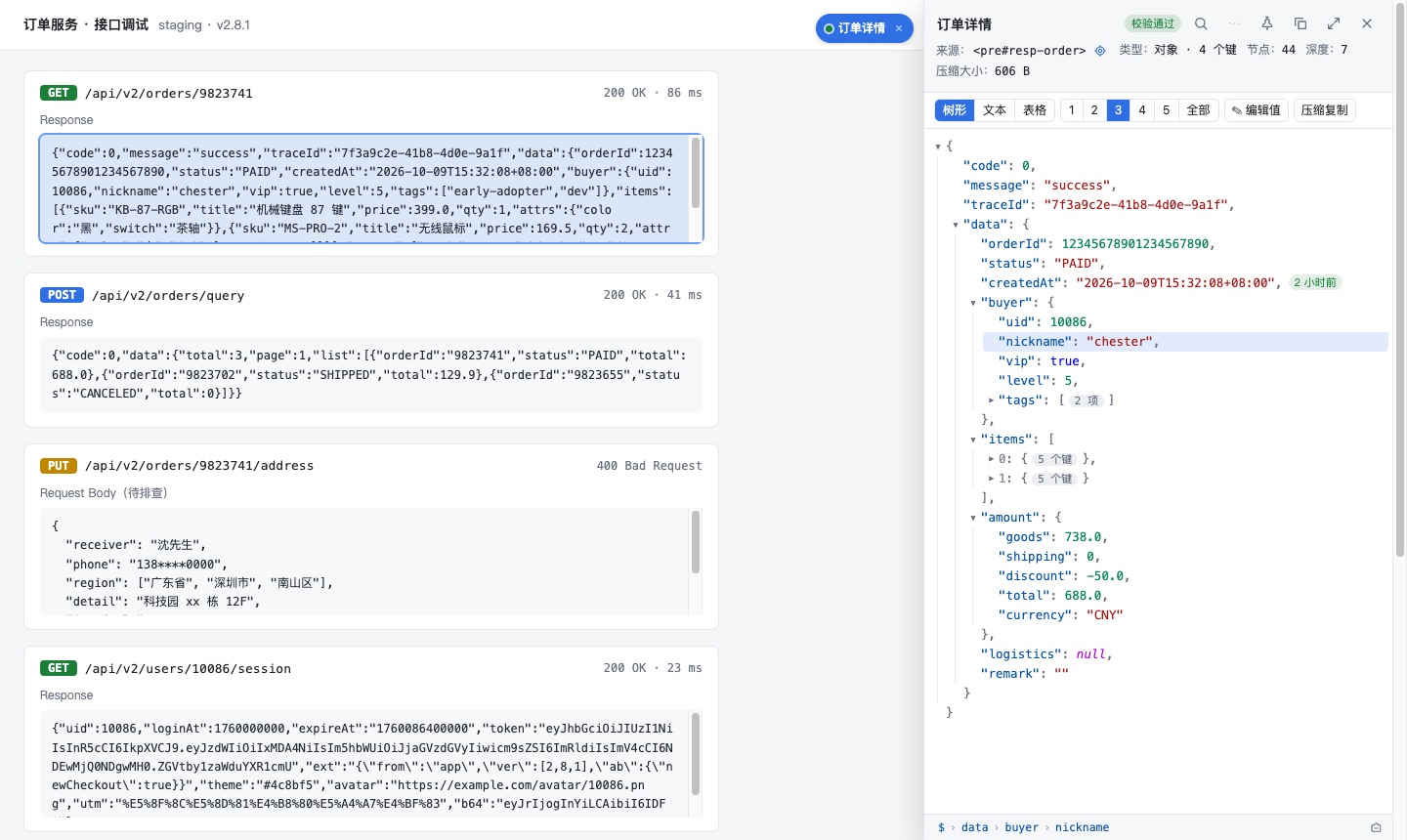
右键一键格式化 · 可折叠树

Right-click to format · collapsible tree

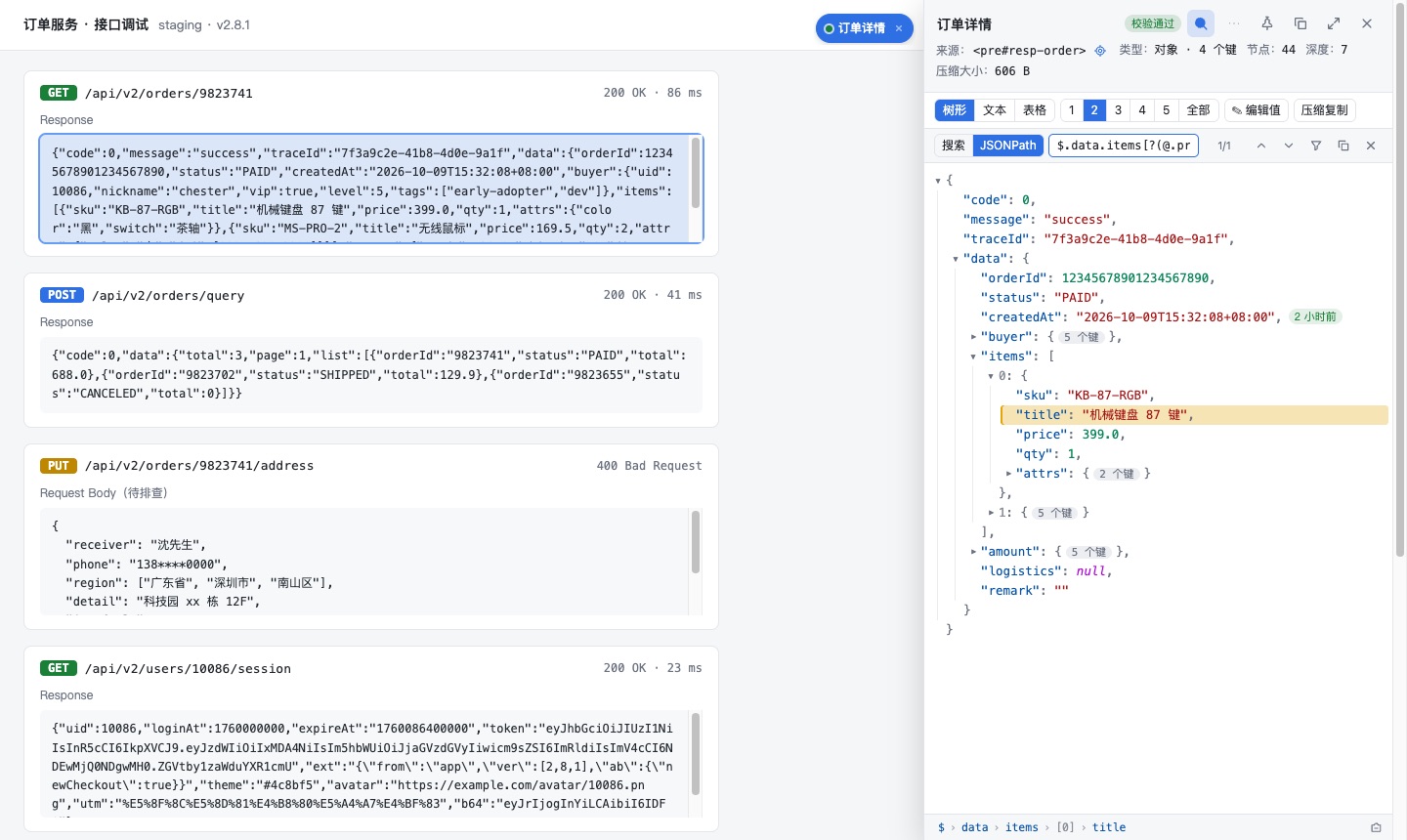
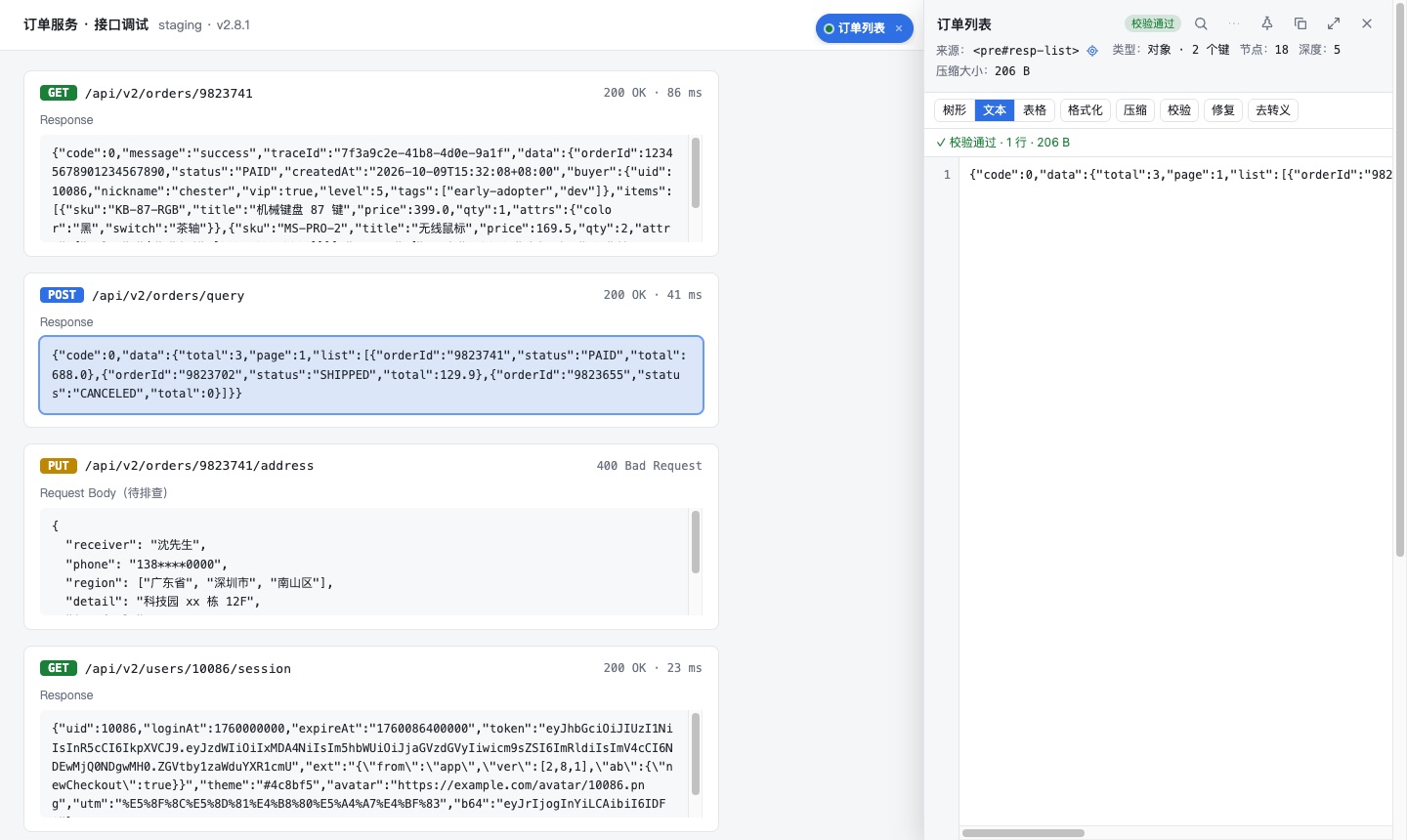
右键任意节点即可原地格式化,自动找到完整 JSON 节点,兼容 callback({...}) 包裹、转义文本、双重编码。一键展开到 1–5 层或全部,Alt + 点击箭头递归展开,超大数组分批渲染不卡顿。

Right-click any element to format in place. It finds the full JSON node and handles callback({...}) wrappers, escaped text and double encoding. Expand to depth 1–5 or all, Alt + click to expand a subtree; huge arrays render in batches.

Right-click to format · collapsible tree

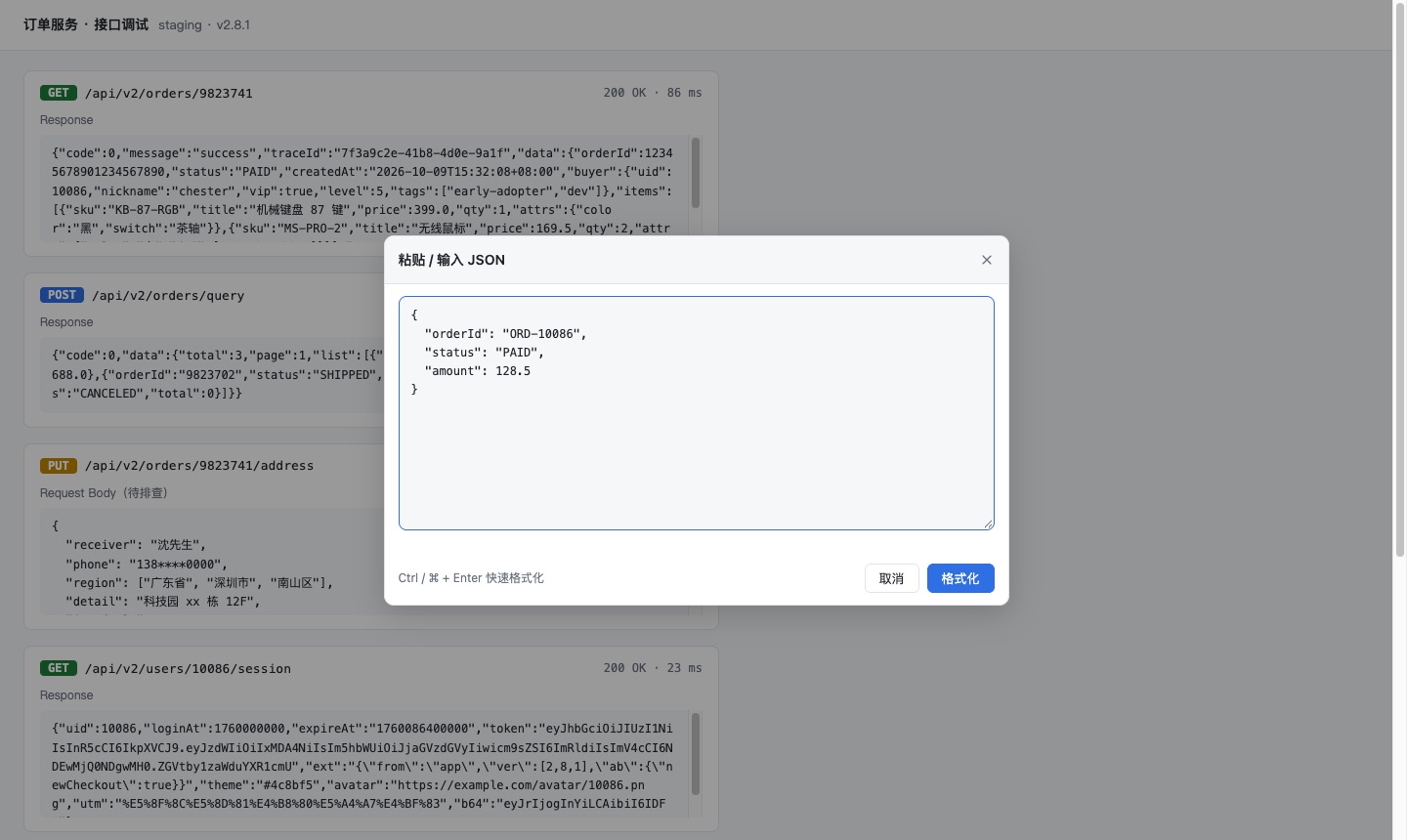
粘贴 / 输入格式化

Paste or type to format

右键工具栏扩展图标 →「粘贴 / 输入 JSON 并格式化…」,不依赖页面节点;JSON / CSV / XML / YAML 均可,Ctrl / ⌘ + Enter 快速提交。

Right-click the toolbar icon → “Paste / Type JSON to format…”. No page element needed; JSON / CSV / XML / YAML all work, and Ctrl / ⌘ + Enter submits.

Paste or type to format

表格视图

Table view

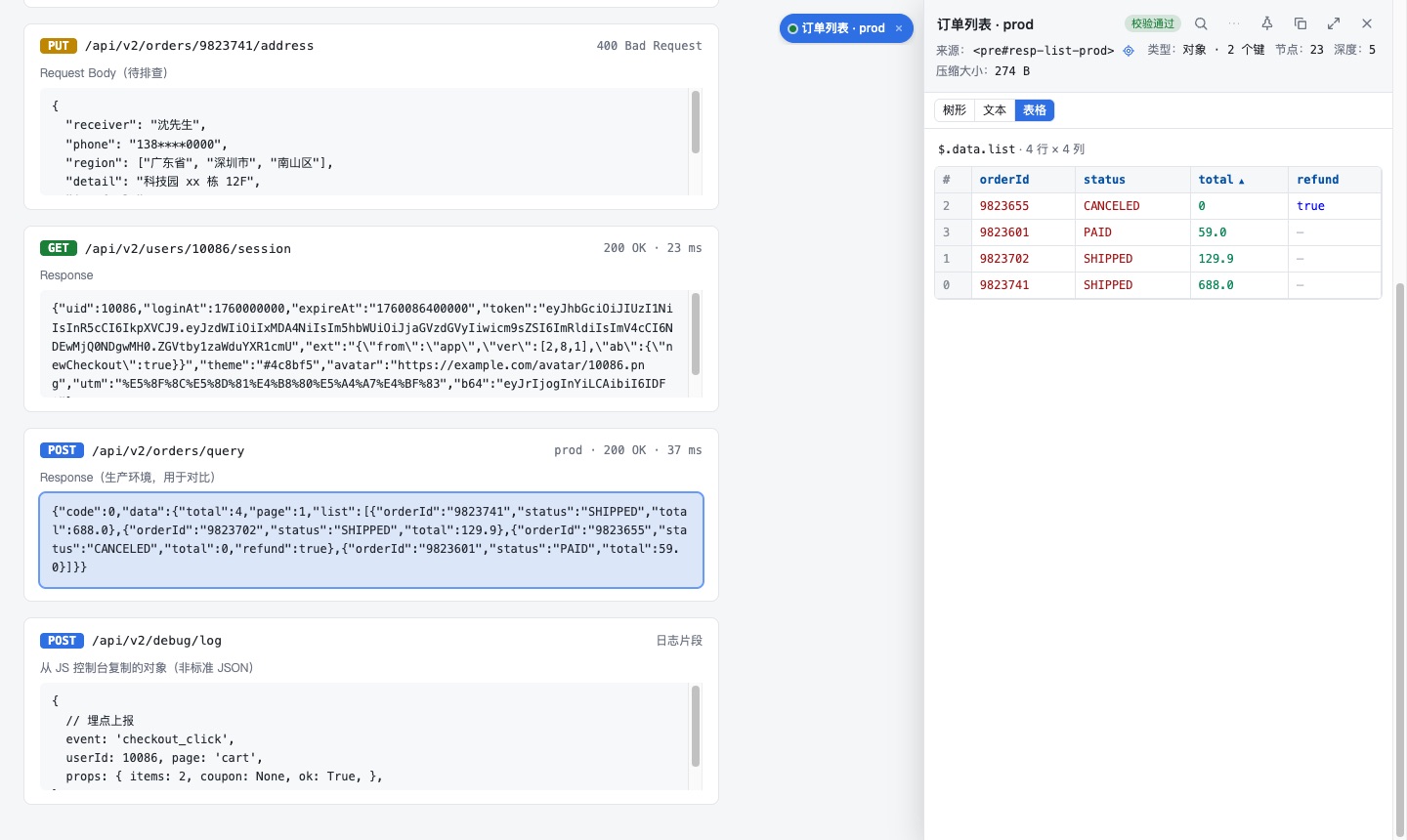
对象数组(如 list: [{…},{…}])以表格显示,列可排序,缺失字段有占位,点击行号跳回树形视图。

Arrays of objects are shown as a sortable table with placeholders for missing fields; click a row number to jump back to the tree.

Table view

多任务 · 多面板并排

Multiple tasks & side-by-side panels

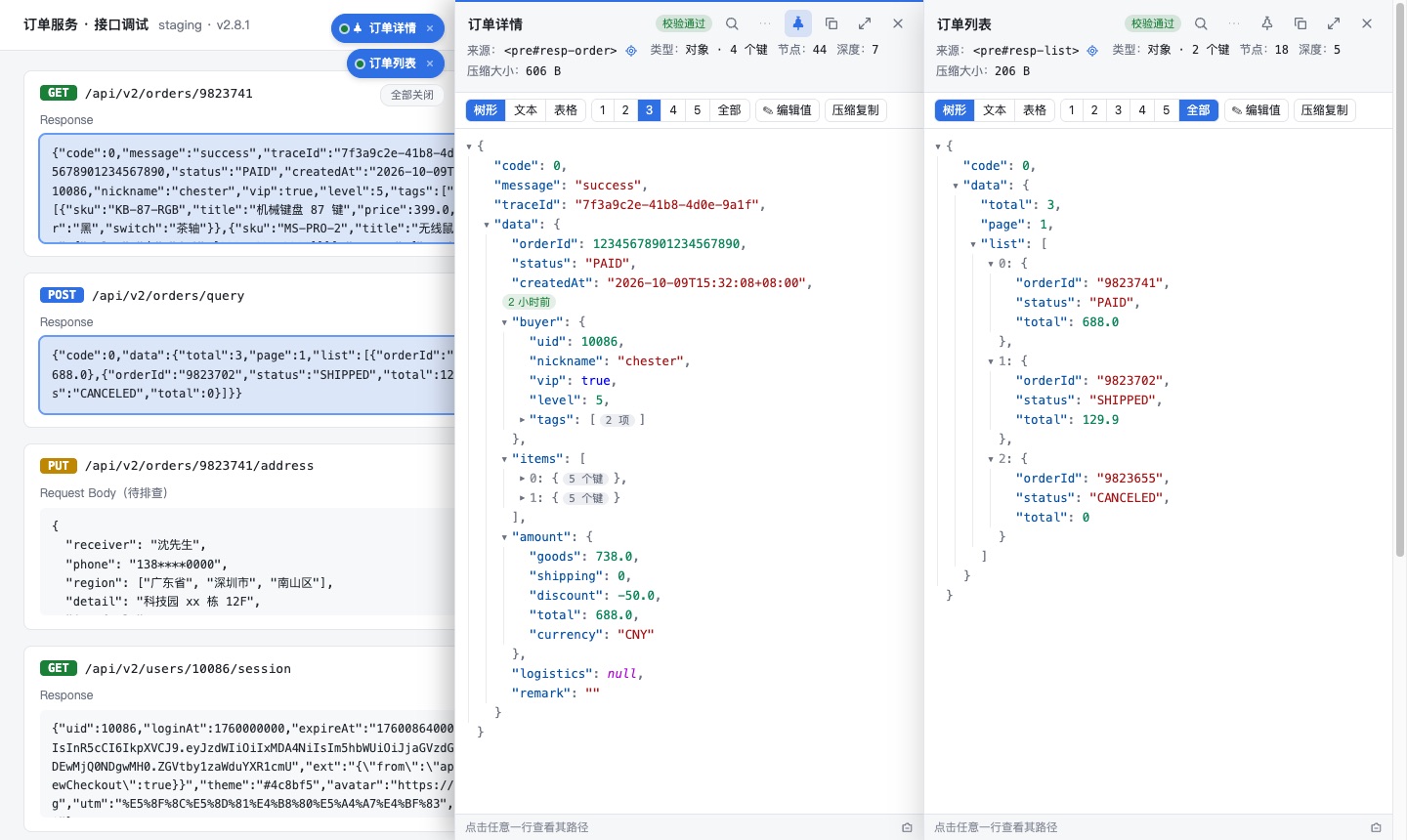
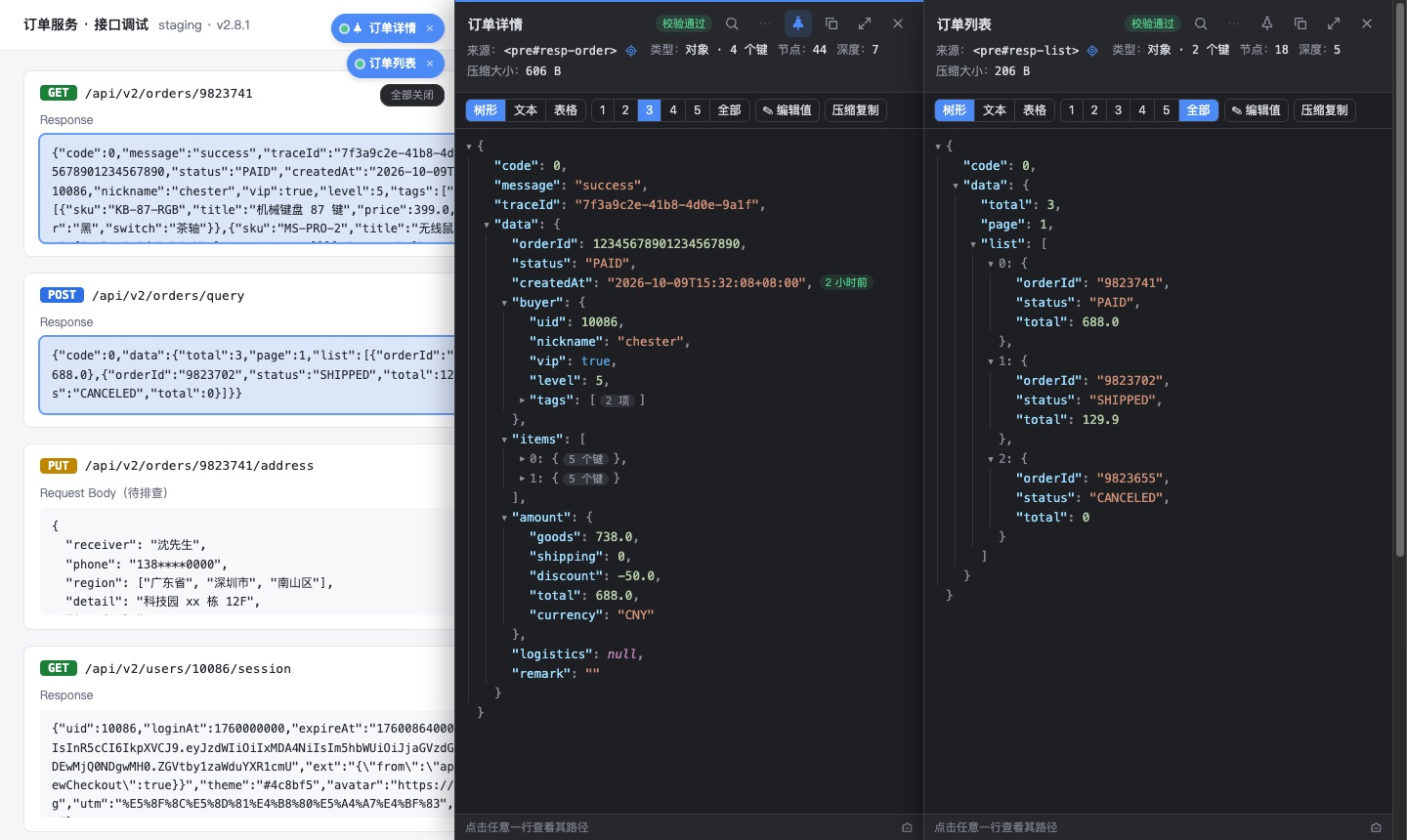
每次右键新建一个任务,标题可编辑;固定的面板一直展开,新任务展开在其右侧并排查看;每个面板宽度可单独拖拽。

Every right-click creates a task with an editable title. Pinned panels stay open and new tasks open to their right; each panel resizes independently.

Multiple tasks & side-by-side panels

拖动面板 · 任务坞 · 源节点联动

Movable panels, task dock & source linking

拖动标题栏空白处把面板移开,不再挡住页面(贴边吸附,双击复位);收起后的任务坞可拖到任意位置。面板展开时页面上的源节点蓝色高亮,一键定位。

Drag the header to slide panels out of the way (edge snapping, double-click to reset); the collapsed dock can go anywhere. While a panel is open its source element is highlighted on the page and can be located in one click.

Movable panels, task dock & source linking

直接打开 .json 接口地址自动格式化

Raw .json pages are formatted automatically

浏览器直接打开 xxx/api/order.json 这类地址时自动渲染,可在设置里关闭。

Opening a JSON URL such as xxx/api/order.json directly renders it automatically; can be turned off in Settings.

查找Find

搜索 / 过滤

Search & filter

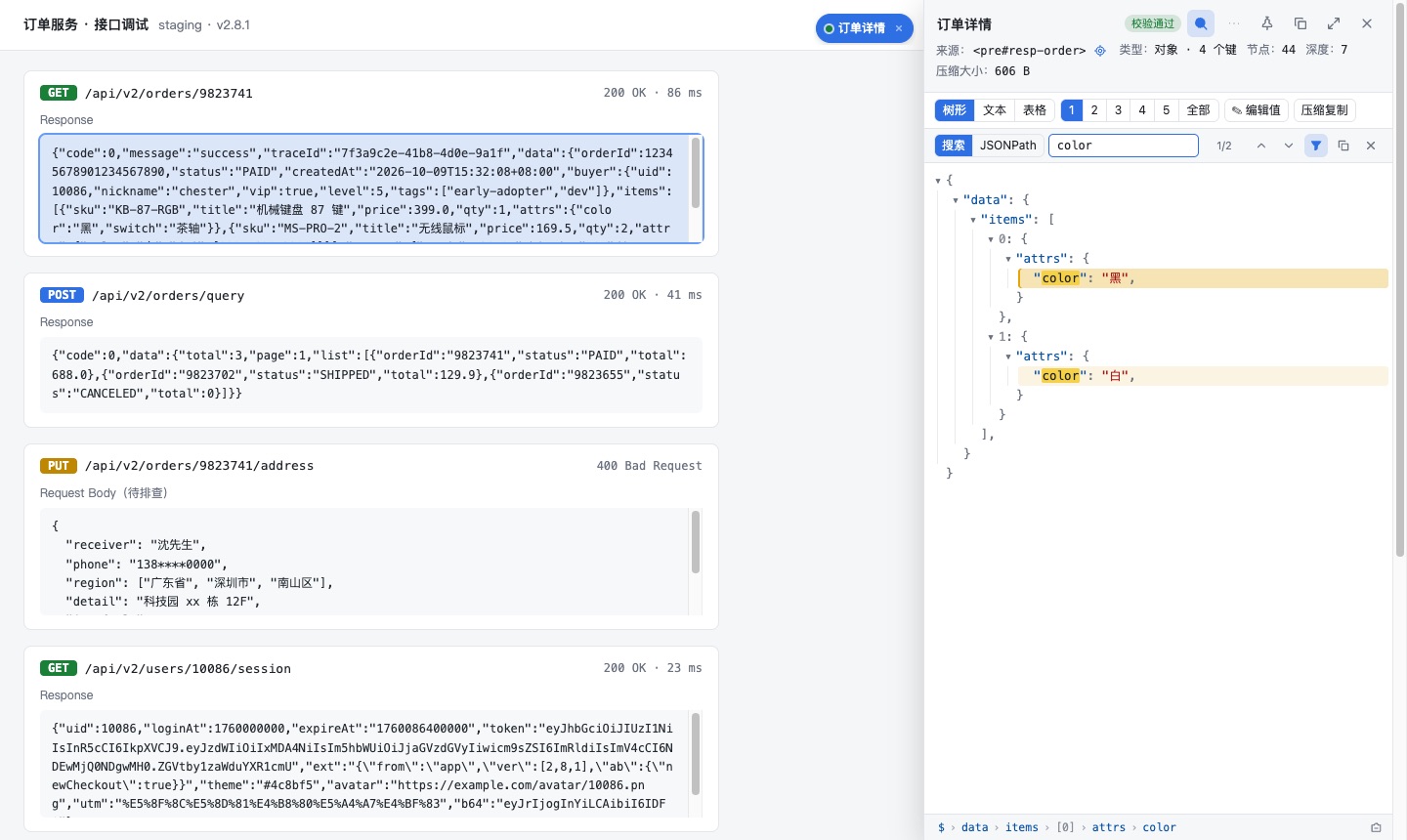
⌘F / Ctrl+F 搜索键和值(未展开的节点也能搜到),支持 /正则/;命中处高亮,上一个 / 下一个自动展开定位;过滤模式只显示命中的分支。

⌘F / Ctrl+F searches keys and values (including collapsed nodes), regex supported. Matches are highlighted, prev / next expands to each one, and filter mode keeps only matching branches.

Search & filter

JSONPath 查询

JSONPath queries

支持子键、下标、负下标、切片、通配、递归 .. 和过滤表达式 [?(@.price > 10 && @.tag =~ /x/i)],结果可一键复制为 JSON 数组。

Child keys, indexes, negative indexes, slices, wildcards, recursive .. and filters like [?(@.price > 10 && @.tag =~ /x/i)]; copy all results as a JSON array.

JSONPath queries

复制路径 · 面包屑

Copy path & breadcrumbs

每行悬停出现「复制路径」按钮,按住 Alt 在 data.items[1] 与 $.data.items[1] 间切换;面板底部面包屑显示选中行的路径,每一段都可点击跳转。

Hover a row for a “copy path” button; hold Alt to switch between data.items[1] and $.data.items[1]. The footer breadcrumbs show the selected row's path and every segment is clickable.

修改与转换Edit & convert

编辑值 · 文本编辑

Edit values & raw text

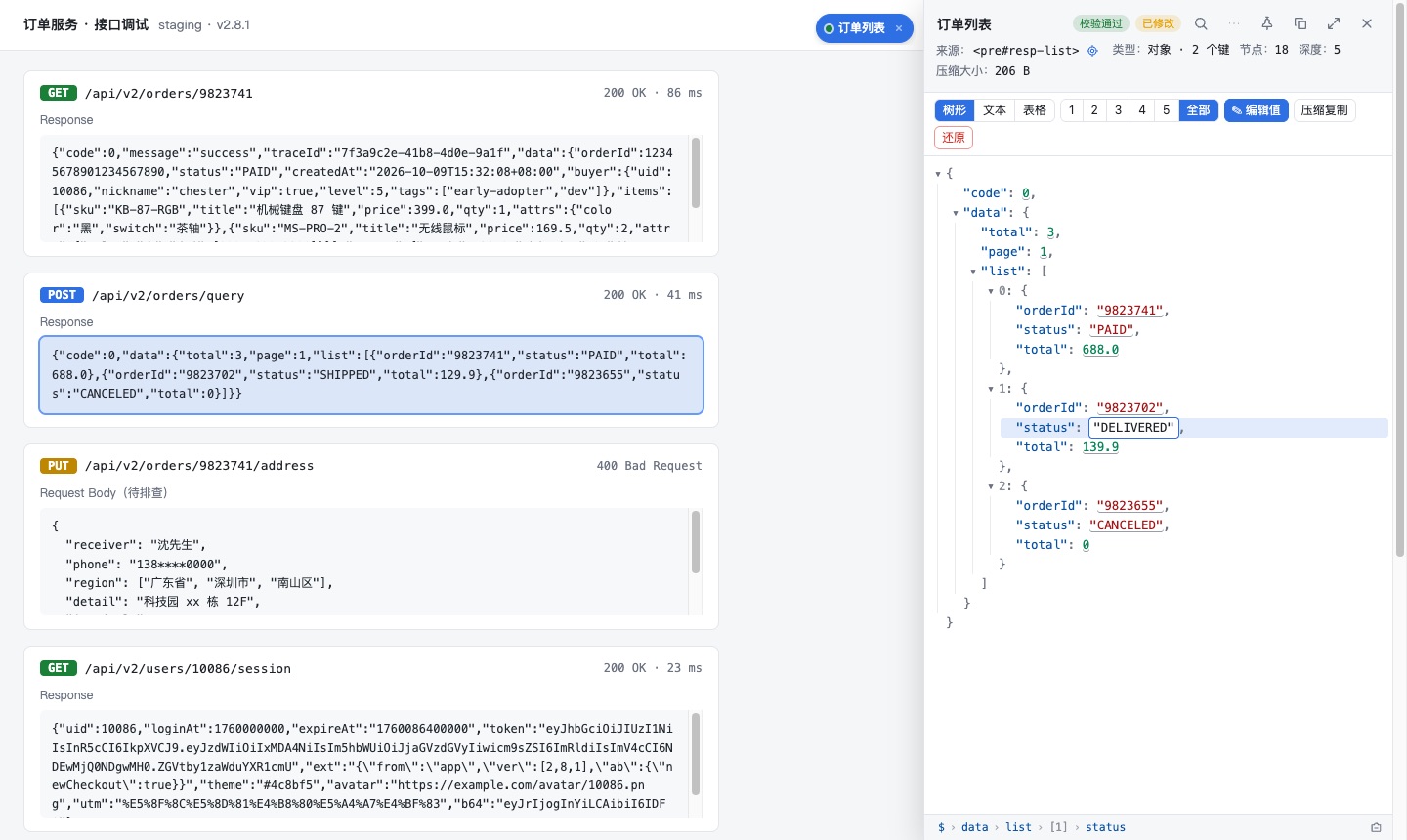
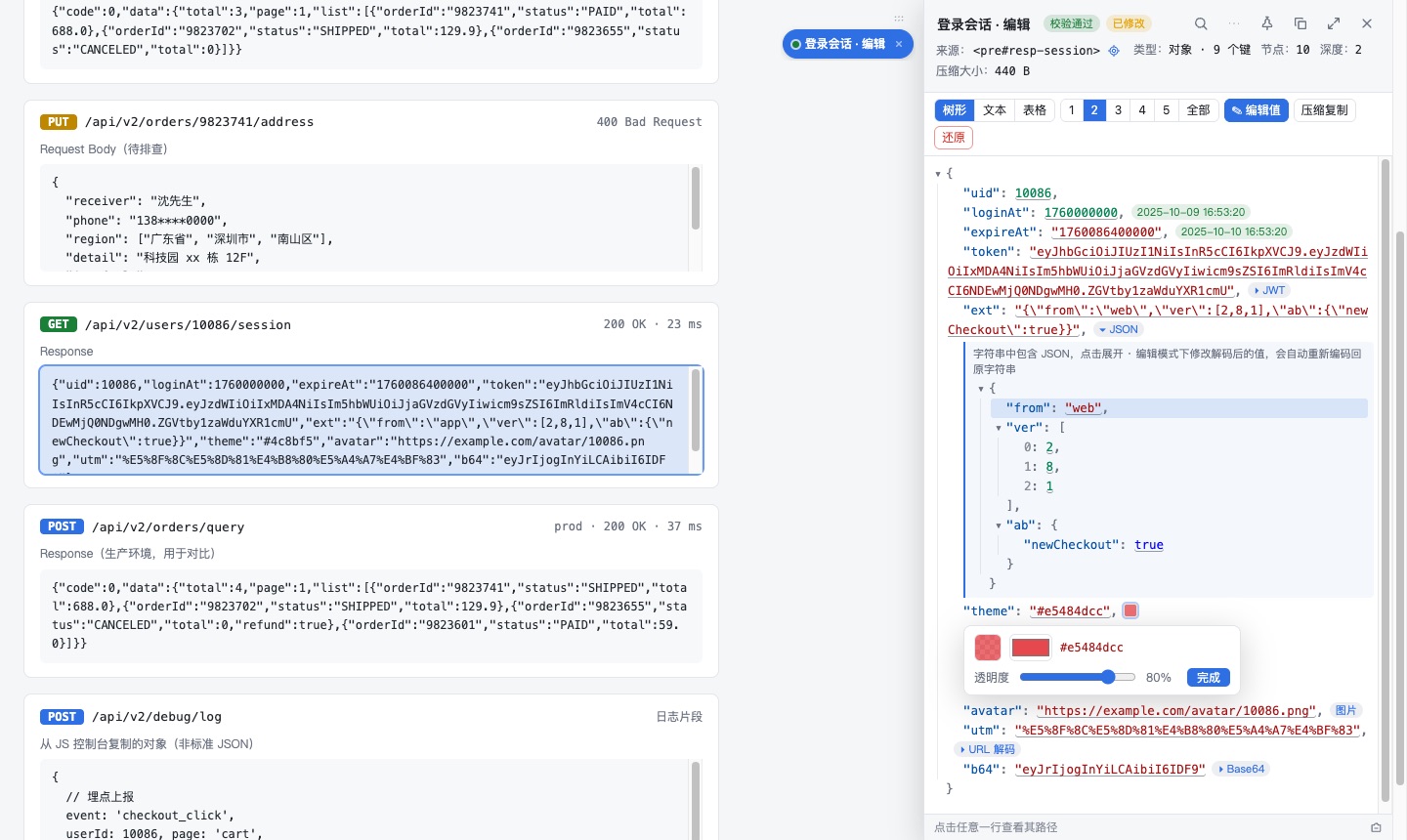
树形视图开启「编辑值」后点值即可修改,按 JSON 字面量识别类型,也能写入对象 / 数组;文本视图可自由编辑。有改动显示「已修改」,「还原」一键撤销。

Turn on “Edit” in tree view and click any value; it is typed as a JSON literal, objects / arrays allowed. Text view allows free editing. Edited tasks show “Modified” and “Restore” undoes everything.

Edit values & raw text

实时校验

Live validation

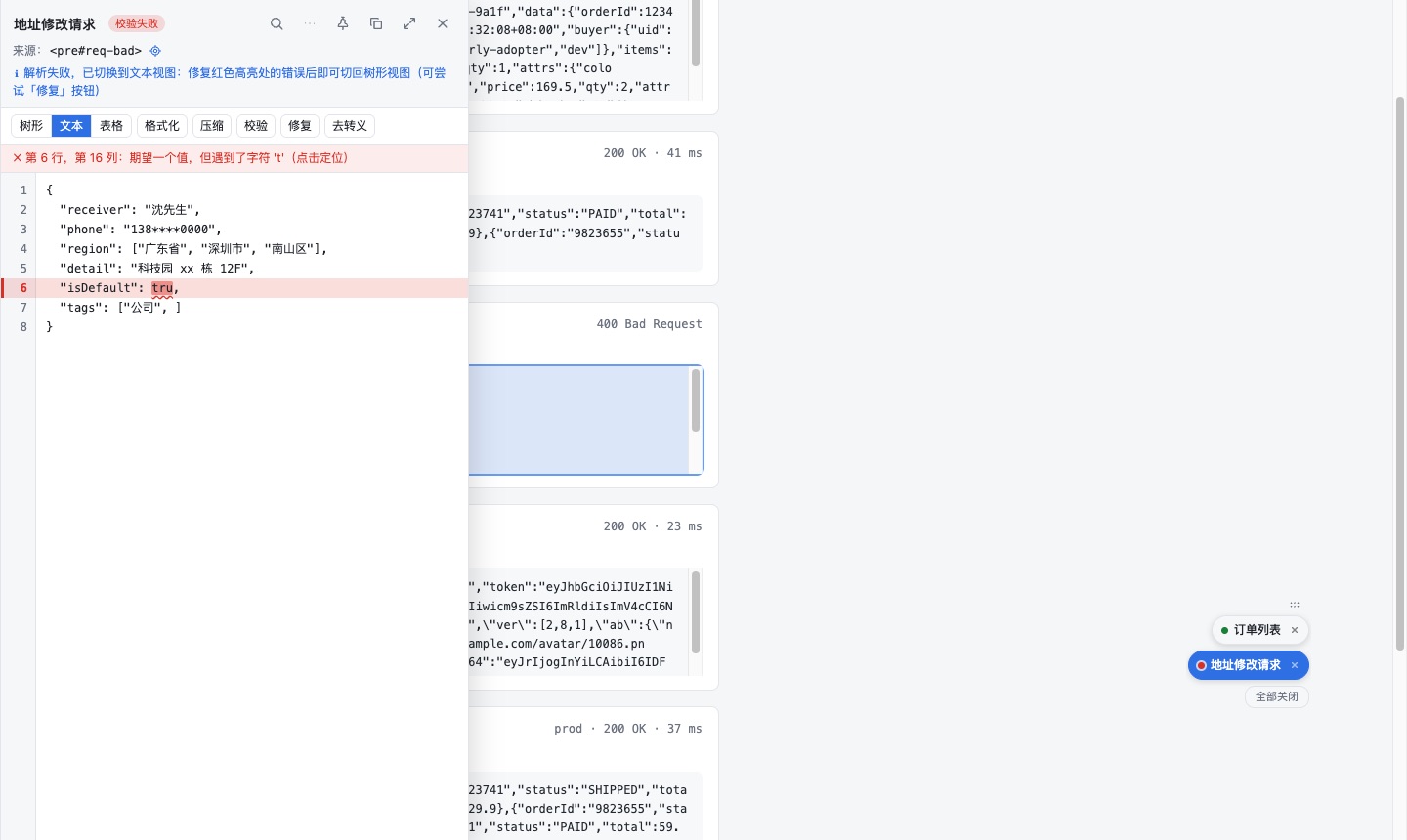
文本视图边输入边校验:错误行红底、出错片段红色波浪线、行号标红;状态栏写明行列与原因,点击跳到出错位置。

Text view validates as you type: red error line, wavy underline on the faulty token, red line number. The status bar shows line, column and reason; click to jump there.

Live validation

值智能解码

Smart value decoding

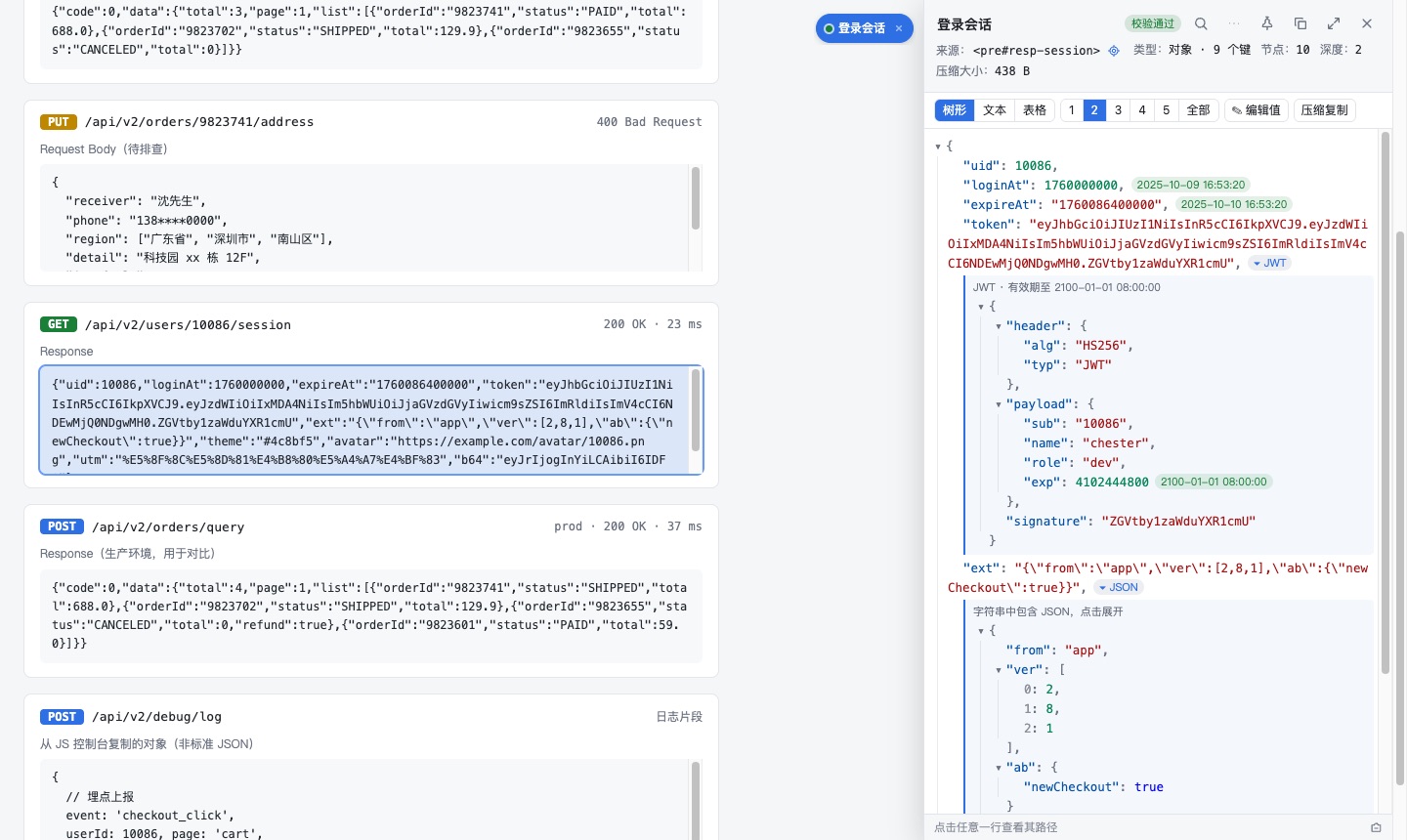
自动识别时间戳、字符串里的 JSON、JWT、Base64、URL 编码、颜色、图片链接,在值旁显示标签,可就地展开并逐层嵌套解码(如 Base64 → JSON → JWT)。

Detects timestamps, JSON inside strings, JWT, Base64, URL encoding, colors and image URLs, labels them next to the value, and expands them in place — layer by layer (e.g. Base64 → JSON → JWT).

Smart value decoding

解码后编辑 · 调色板

Edit decoded values & color picker

开启编辑模式后,解码出来的值也能直接改,自动按原格式重新编码写回原字符串。识别 #hex、0xAARRGGBB、rgb()、rgba()、hsl(),点色块打开调色板调颜色和透明度,按原写法写回。

In edit mode, decoded values are editable and automatically re-encoded in the original format. Colors (#hex, 0xAARRGGBB, rgb(), rgba(), hsl()) open a picker with an alpha slider and are written back in their original notation.

Edit decoded values & color picker

对比:合并视图 / 并排视图

Diff: merged or side-by-side

两个任务生成对比任务:新增 / 删除 / 修改分别用 + / − / ~ 着色。并排视图左右分栏逐行对齐,缺失一侧用斜纹空行占位;可只看差异,可导出差异列表。

Compare two tasks: additions / removals / changes are colored + / − / ~. Side-by-side view shows two aligned columns with hatched padding rows; changes-only mode and an exportable change list included.

Diff: merged or side-by-side

生成类型定义

Type generation

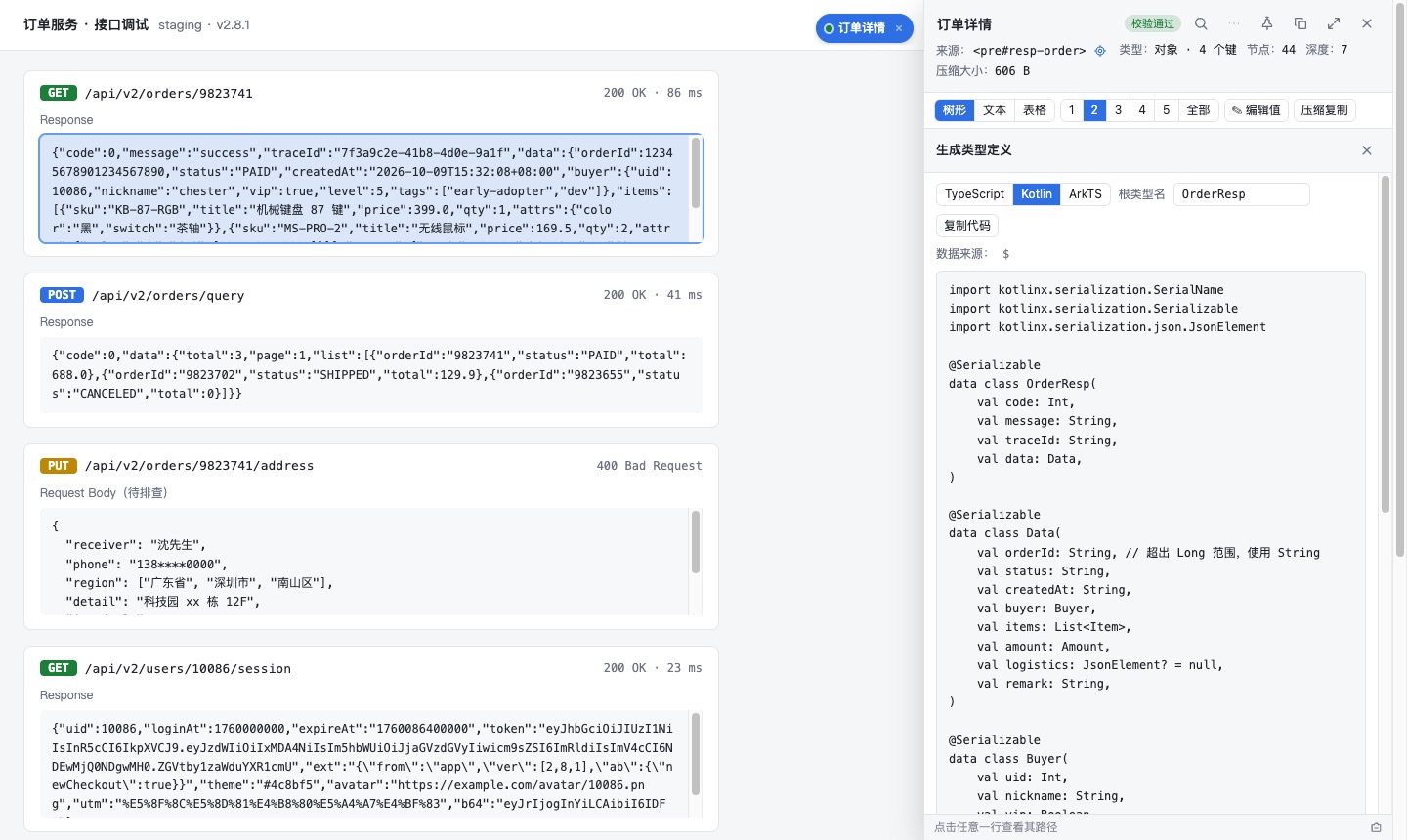
从 JSON 生成 TypeScript interface、Kotlin data class(kotlinx.serialization)、ArkTS interface;合并数组元素结构,推断可选 / 可空字段,超出 Long 的整数用 String。

Generate TypeScript interfaces, Kotlin data classes (kotlinx.serialization) or ArkTS interfaces. Array element shapes are merged, optional / nullable fields inferred, integers beyond Long become String.

Type generation

类型来源可编辑

Editable type source

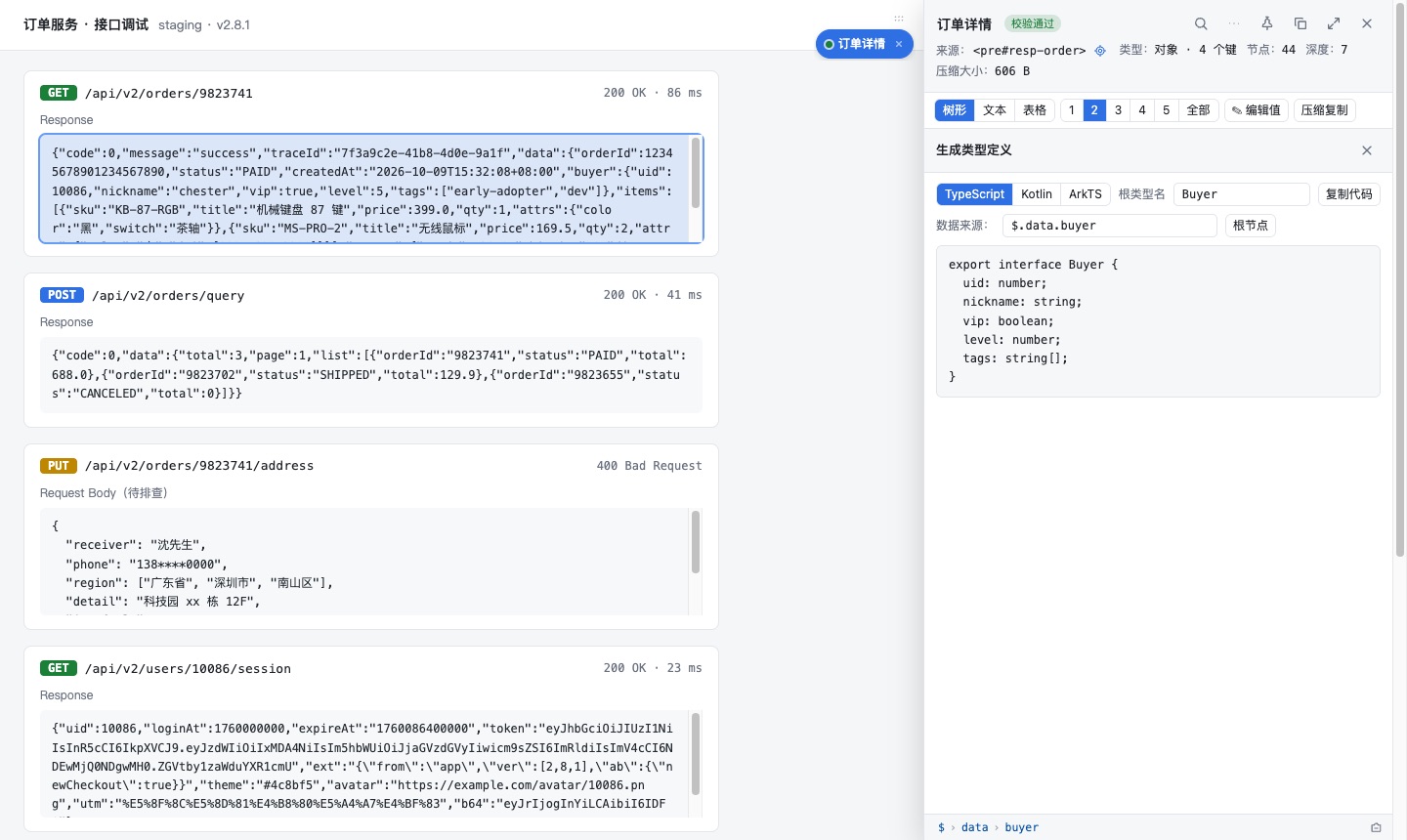
默认取选中的节点(如 $.data.buyer 只生成 Buyer),改成 $ 或点「根节点」生成全部类型,也支持 $.data.list[*] 这类多匹配路径。

Defaults to the selected node ($.data.buyer generates only Buyer); change it to $ (or click “Root”) for every type, or use multi-match paths like $.data.list[*].

Editable type source

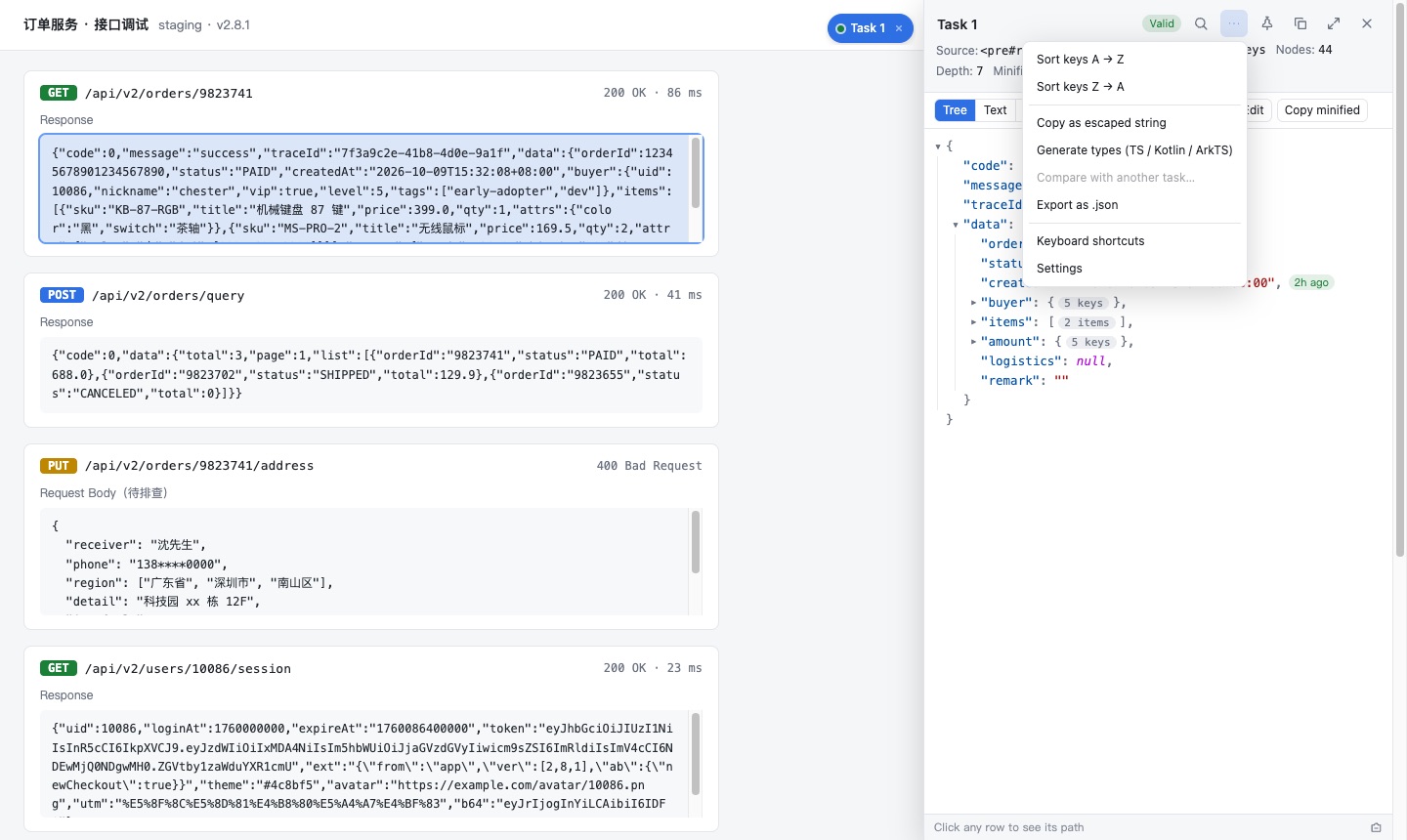
排序 · 转义 · 压缩 · 导出

Sort, escape, minify & export

按键名 A→Z / Z→A 递归排序;复制为转义字符串、去转义;一键压缩或格式化;整段复制,导出 .json(或经「转换格式」导出 .csv / .xml / .yaml)。

Sort keys A→Z / Z→A recursively; copy as an escaped string or unescape; minify or format in one click; copy everything or export .json (or .csv / .xml / .yaml via “Convert format”).

Sort, escape, minify & export

更多More

浅色 / 深色主题

Light & dark themes

面板自动跟随系统外观;Shadow DOM 隔离样式,不使用 innerHTML,兼容 CSP / Trusted Types 严格的页面。

Panels follow the system appearance. Styles are isolated in Shadow DOM, no innerHTML, and it works on pages with strict CSP / Trusted Types.

Light & dark themes

中英文界面

Chinese & English UI

界面语言可在设置页切换,菜单、提示、错误信息完整双语。

Switch the UI language in Settings; menus, hints and error messages are fully bilingual.

Chinese & English UI

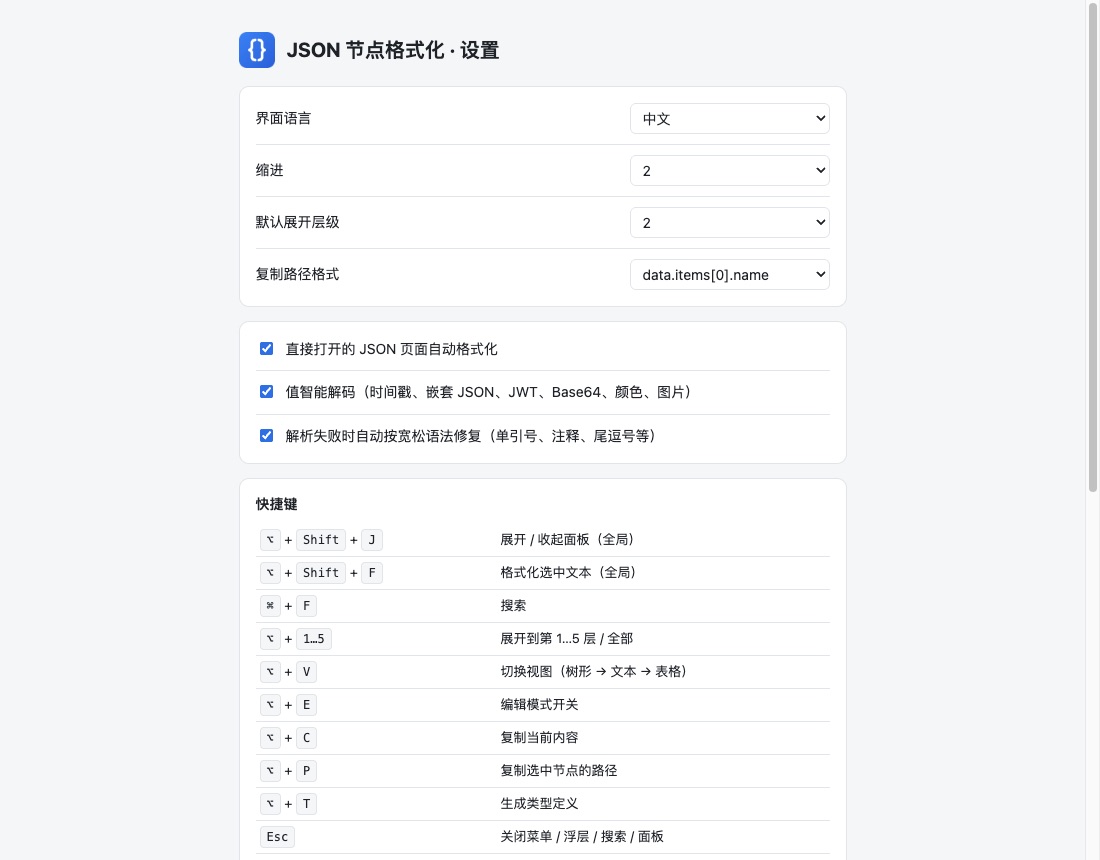
设置页 · 快捷键

Settings & shortcuts

语言、缩进、默认展开层级、路径格式、自动渲染、解码、宽松修复均可配置;Alt+Shift+J 展开 / 收起面板,Alt+Shift+F 格式化选中文本。

Language, indent, default depth, path style, auto-render, decoding and lenient repair are configurable. Alt+Shift+J toggles the panels, Alt+Shift+F formats the selected text.

Settings & shortcuts

精确:保留大整数精度与键顺序

Accurate: big integers & key order

自研解析器保留大整数精度(如 12345678901234567890)和键的原始顺序,浏览器自带的 JSON.parse 做不到。

The built-in parser keeps big-integer precision (e.g. 12345678901234567890) and the original key order, which the browser's JSON.parse cannot do.

本地处理,不上传任何数据

Local only — no data leaves your browser

所有解析、转换都在本地浏览器完成;无统计、无广告代码,设置仅保存在本机。

All parsing and conversion run locally. No analytics, no ads; settings are stored on your device only.